Templates
The Studio SDK includes a powerful Template Manager, enabling you to display available templates that users can select as starting points for their projects. The Template Manager utilizes the PanelTemplates layout component, giving you full flexibility to decide how and where the templates are rendered within your application.
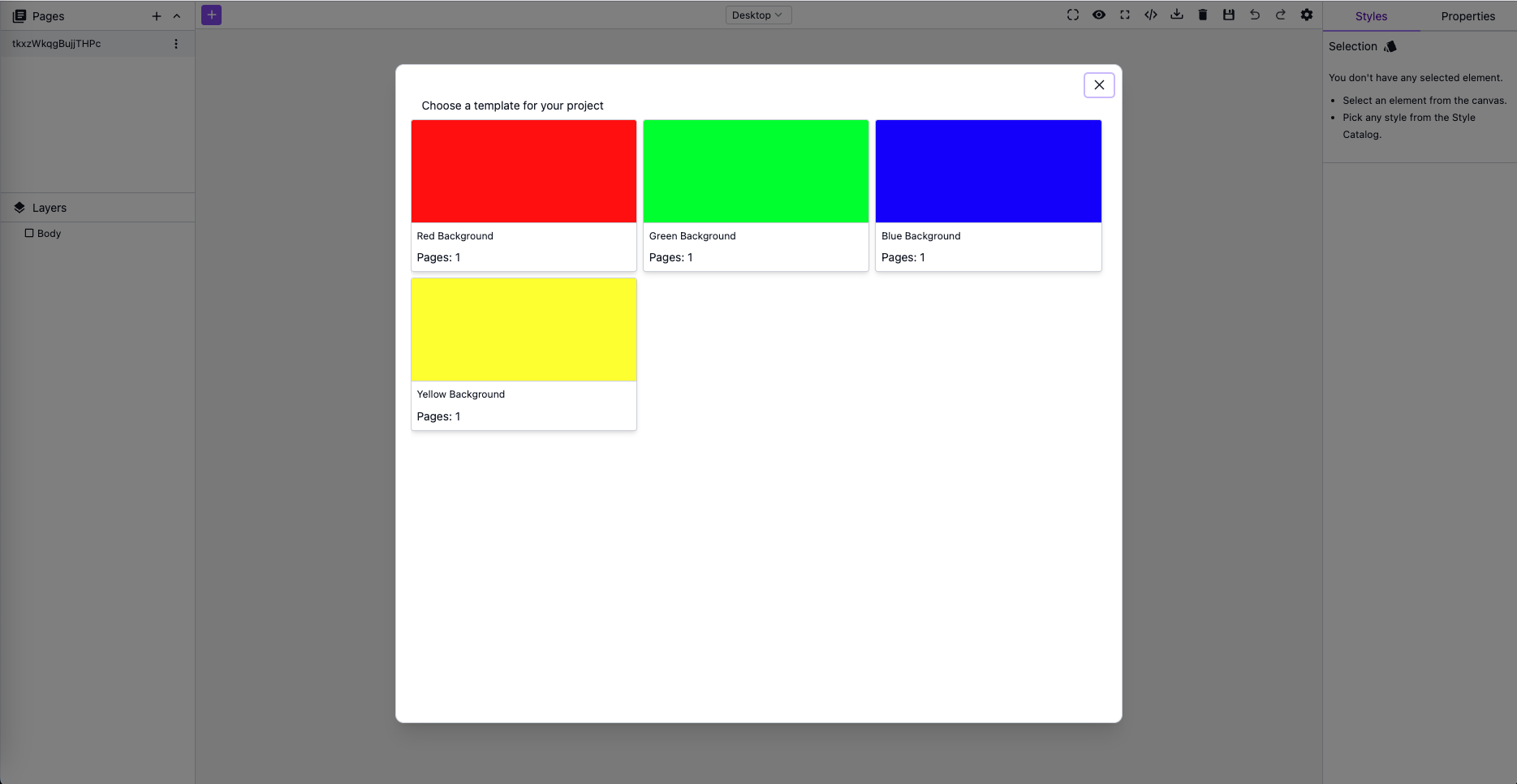
Table of Contents
Initialization
Customize the template-fetching logic by defining a handler using the templates.onLoad option. This handler should return an array of TemplateItem objects, representing the available templates.
The example below demonstrates how to add a button in the top-left corner of the editor to open the PanelTemplates within a dialog:
- React
- JS
- 🍇 Demo
import StudioEditor from '@grapesjs/studio-sdk/react';
import '@grapesjs/studio-sdk/style';

// ...
<StudioEditor
  options={{
    // ...
    layout: {
      default: {
        type: 'row',
        height: '100%',
        children: [
          {
            type: 'canvasSidebarTop',
            sidebarTop: {
              leftContainer: {
                buttons: ({ items }) => [
                  ...items,
                  {
                    id: 'openTemplatesButtonId',
                    size: 's',
                    icon: '<svg viewBox="0 0 24 24"><path d="M20 14H6C3.8 14 2 15.8 2 18S3.8 22 6 22H20C21.1 22 22 21.1 22 20V16C22 14.9 21.1 14 20 14M6 20C4.9 20 4 19.1 4 18S4.9 16 6 16 8 16.9 8 18 7.1 20 6 20M6.3 12L13 5.3C13.8 4.5 15 4.5 15.8 5.3L18.6 8.1C19.4 8.9 19.4 10.1 18.6 10.9L17.7 12H6.3M2 13.5V4C2 2.9 2.9 2 4 2H8C9.1 2 10 2.9 10 4V5.5L2 13.5Z" /></svg>',
                    onClick: ({ editor }) => {
                      editor.runCommand('studio:layoutToggle', {
                        id: 'my-templates-panel',
                        header: false,
                        placer: { type: 'dialog', title: 'Choose a template for your project', size: 'l' },
                        layout: {
                          type: 'panelTemplates',
                          content: { itemsPerRow: 3 },
                          onSelect: ({ loadTemplate, template }) => {
                            // Load the selected template to the current project
                            loadTemplate(template);
                            // Close the dialog layout
                            editor.runCommand('studio:layoutRemove', { id: 'my-templates-panel' })
                          }
                        }
                      });
                    }
                  }
                ]
              }
            },
            grow: true
          },
          { type: 'sidebarRight' }
        ]
      }
    },
    templates: {
      // The onLoad can be an asyncronous function, so you can fetch templates from your API
      onLoad: async () => [
        {
          id: 'template1',
          name: 'Template 1',
          data: {
            pages: [
              {
                name: 'Home',
                component: '<h1 class="title">Template 1</h1><style>.title { color: red; font-size: 10rem; text-align: center }</style>'
              }
            ]
          }
        },
        {
          id: 'template2',
          name: 'Template 2',
          data: {
            pages: [
              { component: '<h1 class="title">Template 2</h1><style>.title { color: blue; font-size: 10rem; text-align: center }</style>' }
            ]
          }
        },
        {
          id: 'template3',
          name: 'Template 3',
          data: {
            pages: [
              { component: '<h1 class="title">Template 3</h1><style>.title { color: green; font-size: 10rem; text-align: center }</style>' }
            ]
          }
        },
        {
          id: 'template4',
          name: 'Template 4',
          data: {
            pages: [
              { component: '<h1 class="title">Template 4</h1><style>.title { color: violet; font-size: 10rem; text-align: center }</style>' }
            ]
          }
        },
      ]
    }

  }}
/>
import createStudioEditor from '@grapesjs/studio-sdk';
import '@grapesjs/studio-sdk/style';

// ...
createStudioEditor({
  // ...
  layout: {
    default: {
      type: 'row',
      height: '100%',
      children: [
        {
          type: 'canvasSidebarTop',
          sidebarTop: {
            leftContainer: {
              buttons: ({ items }) => [
                ...items,
                {
                  id: 'openTemplatesButtonId',
                  size: 's',
                  icon: '<svg viewBox="0 0 24 24"><path d="M20 14H6C3.8 14 2 15.8 2 18S3.8 22 6 22H20C21.1 22 22 21.1 22 20V16C22 14.9 21.1 14 20 14M6 20C4.9 20 4 19.1 4 18S4.9 16 6 16 8 16.9 8 18 7.1 20 6 20M6.3 12L13 5.3C13.8 4.5 15 4.5 15.8 5.3L18.6 8.1C19.4 8.9 19.4 10.1 18.6 10.9L17.7 12H6.3M2 13.5V4C2 2.9 2.9 2 4 2H8C9.1 2 10 2.9 10 4V5.5L2 13.5Z" /></svg>',
                  onClick: ({ editor }) => {
                    editor.runCommand('studio:layoutToggle', {
                      id: 'my-templates-panel',
                      header: false,
                      placer: { type: 'dialog', title: 'Choose a template for your project', size: 'l' },
                      layout: {
                        type: 'panelTemplates',
                        content: { itemsPerRow: 3 },
                        onSelect: ({ loadTemplate, template }) => {
                          // Load the selected template to the current project
                          loadTemplate(template);
                          // Close the dialog layout
                          editor.runCommand('studio:layoutRemove', { id: 'my-templates-panel' })
                        }
                      }
                    });
                  }
                }
              ]
            }
          },
          grow: true
        },
        { type: 'sidebarRight' }
      ]
    }
  },
  templates: {
    // The onLoad can be an asyncronous function, so you can fetch templates from your API
    onLoad: async () => [
      {
        id: 'template1',
        name: 'Template 1',
        data: {
          pages: [
            {
              name: 'Home',
              component: '<h1 class="title">Template 1</h1><style>.title { color: red; font-size: 10rem; text-align: center }</style>'
            }
          ]
        }
      },
      {
        id: 'template2',
        name: 'Template 2',
        data: {
          pages: [
            { component: '<h1 class="title">Template 2</h1><style>.title { color: blue; font-size: 10rem; text-align: center }</style>' }
          ]
        }
      },
      {
        id: 'template3',
        name: 'Template 3',
        data: {
          pages: [
            { component: '<h1 class="title">Template 3</h1><style>.title { color: green; font-size: 10rem; text-align: center }</style>' }
          ]
        }
      },
      {
        id: 'template4',
        name: 'Template 4',
        data: {
          pages: [
            { component: '<h1 class="title">Template 4</h1><style>.title { color: violet; font-size: 10rem; text-align: center }</style>' }
          ]
        }
      },
    ]
  }

})
template.data is the GrapesJS project data JSON. You can always get the current data from an existing project in Studio via editor.getProjectData().
Templates returned by the custom onLoad handler are shared across all panelTemplates instances. To have different templates in each panel, use the templates prop instead.
In this example, instead of using a button, we open the dialog when the editor loads:
- React
- JS
- 🍇 Demo
import StudioEditor from '@grapesjs/studio-sdk/react';
import '@grapesjs/studio-sdk/style';

// ...
<StudioEditor
  options={{
    // ...
    plugins: [
      editor =>
        editor.onReady(() => {
          editor.runCommand('studio:layoutToggle', {
            id: 'my-templates-panel',
            header: false,
            placer: { type: 'dialog', title: 'Choose a template for your project', size: 'l' },
            layout: {
              type: 'panelTemplates',
              content: { itemsPerRow: 3 },
              onSelect: ({ loadTemplate, template }) => {
                loadTemplate(template);
                editor.runCommand('studio:layoutRemove', { id: 'my-templates-panel' })
              }
            }
          });
        })
    ],
    templates: {
      onLoad: async () => [
        {
          id: 'template1',
          name: 'Template 1',
          data: {
            pages: [
              {
                name: 'Home',
                component: '<h1 class="title">Template 1</h1><style>.title { color: red; font-size: 10rem; text-align: center }</style>'
              }
            ]
          }
        },
        {
          id: 'template2',
          name: 'Template 2',
          data: {
            pages: [
              { component: '<h1 class="title">Template 2</h1><style>.title { color: blue; font-size: 10rem; text-align: center }</style>' }
            ]
          }
        },
        {
          id: 'template3',
          name: 'Template 3',
          data: {
            pages: [
              { component: '<h1 class="title">Template 3</h1><style>.title { color: green; font-size: 10rem; text-align: center }</style>' }
            ]
          }
        },
        {
          id: 'template4',
          name: 'Template 4',
          data: {
            pages: [
              { component: '<h1 class="title">Template 4</h1><style>.title { color: violet; font-size: 10rem; text-align: center }</style>' }
            ]
          }
        },
      ]
    }

  }}
/>
import createStudioEditor from '@grapesjs/studio-sdk';
import '@grapesjs/studio-sdk/style';

// ...
createStudioEditor({
  // ...
  plugins: [
    editor =>
      editor.onReady(() => {
        editor.runCommand('studio:layoutToggle', {
          id: 'my-templates-panel',
          header: false,
          placer: { type: 'dialog', title: 'Choose a template for your project', size: 'l' },
          layout: {
            type: 'panelTemplates',
            content: { itemsPerRow: 3 },
            onSelect: ({ loadTemplate, template }) => {
              loadTemplate(template);
              editor.runCommand('studio:layoutRemove', { id: 'my-templates-panel' })
            }
          }
        });
      })
  ],
  templates: {
    onLoad: async () => [
      {
        id: 'template1',
        name: 'Template 1',
        data: {
          pages: [
            {
              name: 'Home',
              component: '<h1 class="title">Template 1</h1><style>.title { color: red; font-size: 10rem; text-align: center }</style>'
            }
          ]
        }
      },
      {
        id: 'template2',
        name: 'Template 2',
        data: {
          pages: [
            { component: '<h1 class="title">Template 2</h1><style>.title { color: blue; font-size: 10rem; text-align: center }</style>' }
          ]
        }
      },
      {
        id: 'template3',
        name: 'Template 3',
        data: {
          pages: [
            { component: '<h1 class="title">Template 3</h1><style>.title { color: green; font-size: 10rem; text-align: center }</style>' }
          ]
        }
      },
      {
        id: 'template4',
        name: 'Template 4',
        data: {
          pages: [
            { component: '<h1 class="title">Template 4</h1><style>.title { color: violet; font-size: 10rem; text-align: center }</style>' }
          ]
        }
      },
    ]
  }

})
Properties
TemplatesConfig properties
Show properties
| Property | Type | Description |
|---|---|---|
onLoad | function | Provide a custom handler for loading list of available templates to display in the templates layout panel. It should return an array of TemplateItems. Example |
TemplateItem properties
Show properties
| Property | Type | Description |
|---|---|---|
id* | string | Unique id for this template item. Example |
name* | string | Name displayed for this template item. Example |
media | string | A thumbnail URL for this template. Example |
author | object | An object containing the name of the author and optionally a link to his socials/website. Example |
data | object | GrapesJS project data that will be loaded when the user selects this template. Example |
I18n
The labels of the templates panel can be translated into different languages:
- React
- JS
- 🍇 Demo
import StudioEditor from '@grapesjs/studio-sdk/react';
import '@grapesjs/studio-sdk/style';

// ...
<StudioEditor
  options={{
    // ...
    plugins: [
      editor =>
        editor.onReady(() => {
          editor.runCommand('studio:layoutToggle', {
            id: 'my-templates-panel',
            header: false,
            placer: { type: 'dialog', title: 'Choose a template for your project', size: 'l' },
            layout: {
              type: 'panelTemplates',
              content: { itemsPerRow: 3 },
            }
          });
        })
    ],
    templates: {
      // return empty array
      onLoad: async () => []
    },
    i18n: {
      locales: {
        en: {
          templates: {
            notFound: 'No templates found'
          }
        }
      }
    }
  }}
/>
import createStudioEditor from '@grapesjs/studio-sdk';
import '@grapesjs/studio-sdk/style';

// ...
createStudioEditor({
  // ...
  plugins: [
    editor =>
      editor.onReady(() => {
        editor.runCommand('studio:layoutToggle', {
          id: 'my-templates-panel',
          header: false,
          placer: { type: 'dialog', title: 'Choose a template for your project', size: 'l' },
          layout: {
            type: 'panelTemplates',
            content: { itemsPerRow: 3 },
          }
        });
      })
  ],
  templates: {
    // return empty array
    onLoad: async () => []
  },
  i18n: {
    locales: {
      en: {
        templates: {
          notFound: 'No templates found'
        }
      }
    }
  }
})
Platform API Templates
You can use the Platform API to fetch templates from your workspace or from the public catalog. This allows you to manage templates directly from the Studio Platform and have them available in your editor integration.
Backend setup
Generate an API Key from your Platform API page and store it securely on your backend (e.g. .env file).
GRAPES_PLATFORM_API_KEY=YOUR_PLATFORM_API_KEY
There are two main endpoints for templates that you need to configure in your backend:
/v1/templatesto list templates/v1/templates/[templateId]to fetch the template withprojectDatato load
Below are examples of how your backend endpoints might look using something like Next.js:
// Example route `/api/templates`
export const GET = async req => {
  const source = 'all'; // 'public' for public catalog, 'workspace' for your workspace templates, or 'all' for both
  const type = 'web'; // or 'email' if you want to fetch email templates
  const response = await fetch(`https://api.grapesjs.com/v1/templates?source=${source}&type=${type}`, {
    headers: { Authorization: `Bearer ${process.env.GRAPES_PLATFORM_API_KEY}` }
  });

  return Response.json(await response.json());

};
// Example route `/api/templates/[templateId]`
export const GET = async (req, { params }) => {
  const { templateId } = params;
  const response = await fetch(`https://api.grapesjs.com/v1/templates/${templateId}?withProjectData=true`, {
    headers: { Authorization: `Bearer ${process.env.GRAPES_PLATFORM_API_KEY}` }
  });

  return Response.json(await response.json());

};
Call Platform API /templates only from your backend. Browser requests to this endpoint are intentionally blocked by CORS to prevent leaking your private key.
Studio setup
Based on the previous examples with panelTemplates, this is how your Studio configuration might look to fetch templates from your backend and load them when selected by the user:
- React
- JS
import StudioEditor from '@grapesjs/studio-sdk/react';
import '@grapesjs/studio-sdk/style';

// ...
<StudioEditor
  options={{
    templates: {
      onLoad: async () => {
        const response = await fetch('/api/templates');
        const result = await response.json();
        return result.items;
      }
    },
    layout: {
      default: {
        type: 'row',
        style: { height: '100%' },
        children: [
          {
            type: 'panelTemplates',
            // ...
            onSelect: async ({ template, loadTemplate }) => {
              const response = await fetch(`/api/templates/${template.id}`);
              const result = await response.json();
              loadTemplate({ ...result.template, data: result.projectData });
            }
          },
          { type: 'canvas' }
        ]
      }
    },

  }}
/>
import createStudioEditor from '@grapesjs/studio-sdk';
import '@grapesjs/studio-sdk/style';

// ...
createStudioEditor({
  templates: {
    onLoad: async () => {
      const response = await fetch('/api/templates');
      const result = await response.json();
      return result.items;
    }
  },
  layout: {
    default: {
      type: 'row',
      style: { height: '100%' },
      children: [
        {
          type: 'panelTemplates',
          // ...
          onSelect: async ({ template, loadTemplate }) => {
            const response = await fetch(`/api/templates/${template.id}`);
            const result = await response.json();
            loadTemplate({ ...result.template, data: result.projectData });
          }
        },
        { type: 'canvas' }
      ]
    }
  },

})