List Pages
Project types | web |
Plan | Startup plan |
Add a list component that dynamically generates navigation links based on the pages in your project.
Install the Studio SDK plugins package:
- npm
- pnpm
- yarn
- CDN
npm i @grapesjs/studio-sdk-plugins
pnpm add @grapesjs/studio-sdk-plugins
yarn add @grapesjs/studio-sdk-plugins
// It's recommended to replace the `latest` tag with the specific latest version to avoid any potential breaking changes.
// The loaded plugin is globally available via `globalThis.StudioSdkPlugins_listPagesComponent`.
"https://unpkg.com/@grapesjs/studio-sdk-plugins@latest/dist/listPagesComponent/index.umd.js"
Import and use the plugin in your project:
- React
- JS
- 🍇 Demo
import StudioEditor from '@grapesjs/studio-sdk/react';
import '@grapesjs/studio-sdk/style';
import { listPagesComponent } from "@grapesjs/studio-sdk-plugins";
// ...
<StudioEditor
  options={{
      // ...
      plugins: [
        listPagesComponent?.init({
          block: { category: 'Extra', label: 'My List Pages' }
        })
      ],
      project: {
        default: {
          pages: [
            {
              id: 'id-home-page',
              name: 'Home',
              component: `
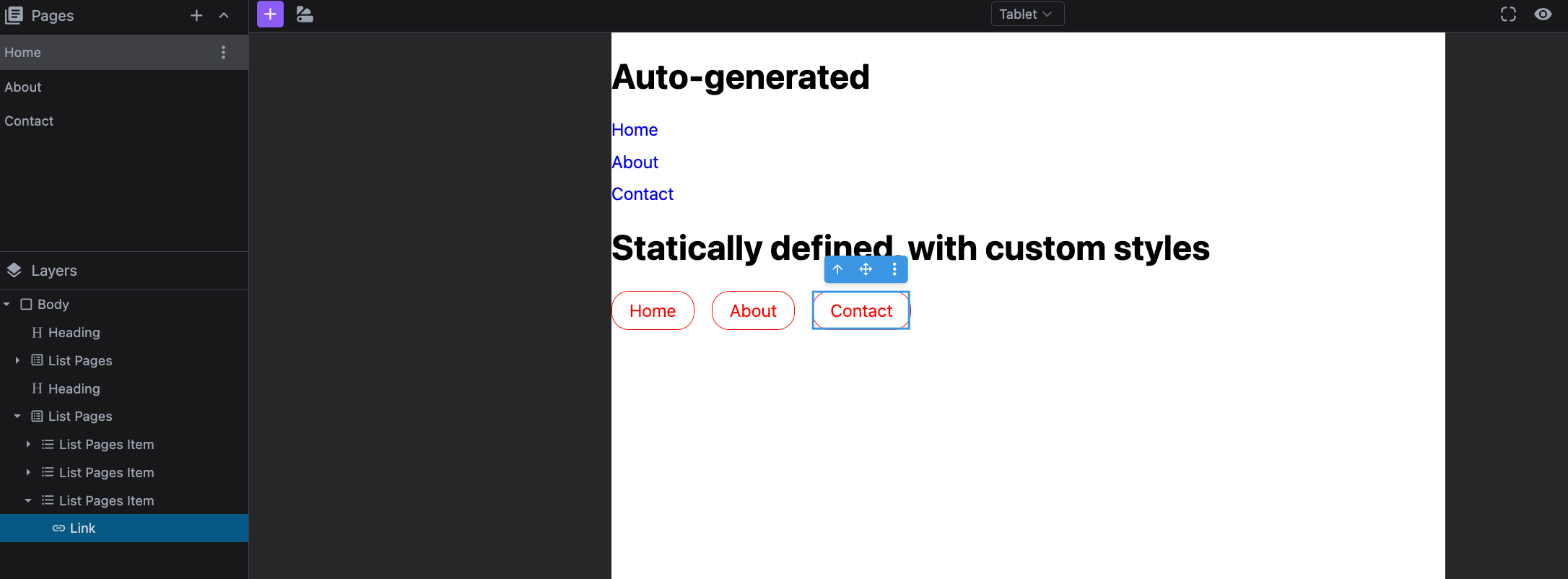
                <h1>Auto-generated</h1>
                <ul data-gjs-type="list-pages"></ul>

                <h1>Statically defined, with custom styles</h1>
                <ul class="list-pages" data-gjs-type="list-pages">
                  <li data-gjs-type="list-pages-item">
                    <a data-gjs-type="list-pages-link" href="page://id-home-page">
                      Home
                    </a>
                  </li>
                  <li data-gjs-type="list-pages-item">
                    <a data-gjs-type="list-pages-link" href="page://id-about-page">
                      About
                    </a>
                  </li>
                  <li data-gjs-type="list-pages-item">
                    <a data-gjs-type="list-pages-link" href="page://id-contact-page">
                      Contact FIX ME
                    </a>
                  </li>
                </ul>

                <style>
                  body {
                    font-family: system-ui;
                  }
                  .list-pages {
                    list-style: none;
                    margin: 0;
                    padding: 0;
                    display: flex;
                    gap: 1rem;
                  }
                  .list-pages a {
                    display: block;
                    color: red;
                    text-decoration: none;
                    border: 1px solid;
                    padding: 0.5rem 1rem;
                    border-radius: 1rem;
                  }
                </style>
              `
            },
            { id: 'id-about-page', name: 'About', component: '<h1>About page</h1>' },
            { id: 'id-contact-page', name: 'Contact', component: '<h1>Contact page</h1>' }
          ]
        }
      }


  }}
/>
import createStudioEditor from '@grapesjs/studio-sdk';
import '@grapesjs/studio-sdk/style';
import { listPagesComponent } from "@grapesjs/studio-sdk-plugins";
// ...
createStudioEditor({
    // ...
    plugins: [
      listPagesComponent?.init({
        block: { category: 'Extra', label: 'My List Pages' }
      })
    ],
    project: {
      default: {
        pages: [
          {
            id: 'id-home-page',
            name: 'Home',
            component: `
              <h1>Auto-generated</h1>
              <ul data-gjs-type="list-pages"></ul>

              <h1>Statically defined, with custom styles</h1>
              <ul class="list-pages" data-gjs-type="list-pages">
                <li data-gjs-type="list-pages-item">
                  <a data-gjs-type="list-pages-link" href="page://id-home-page">
                    Home
                  </a>
                </li>
                <li data-gjs-type="list-pages-item">
                  <a data-gjs-type="list-pages-link" href="page://id-about-page">
                    About
                  </a>
                </li>
                <li data-gjs-type="list-pages-item">
                  <a data-gjs-type="list-pages-link" href="page://id-contact-page">
                    Contact FIX ME
                  </a>
                </li>
              </ul>

              <style>
                body {
                  font-family: system-ui;
                }
                .list-pages {
                  list-style: none;
                  margin: 0;
                  padding: 0;
                  display: flex;
                  gap: 1rem;
                }
                .list-pages a {
                  display: block;
                  color: red;
                  text-decoration: none;
                  border: 1px solid;
                  padding: 0.5rem 1rem;
                  border-radius: 1rem;
                }
              </style>
            `
          },
          { id: 'id-about-page', name: 'About', component: '<h1>About page</h1>' },
          { id: 'id-contact-page', name: 'Contact', component: '<h1>Contact page</h1>' }
        ]
      }
    }


})
Plugin options
| Property | Type | Description |
|---|---|---|
licenseKey | string | The license key for the plugin. This is optional, only required if the plugin is used outside of Studio SDK. Example |
block | object | Block options for the component. See https://grapesjs.com/docs/api/block.html#properties for more information. Example |