YouTube Asset Provider
Project types | web |
Plan | Startup plan |
This plugin adds an asset provider for YouTube videos and integrates a button into the default video component traits, allowing users to easily browse and select YouTube videos.
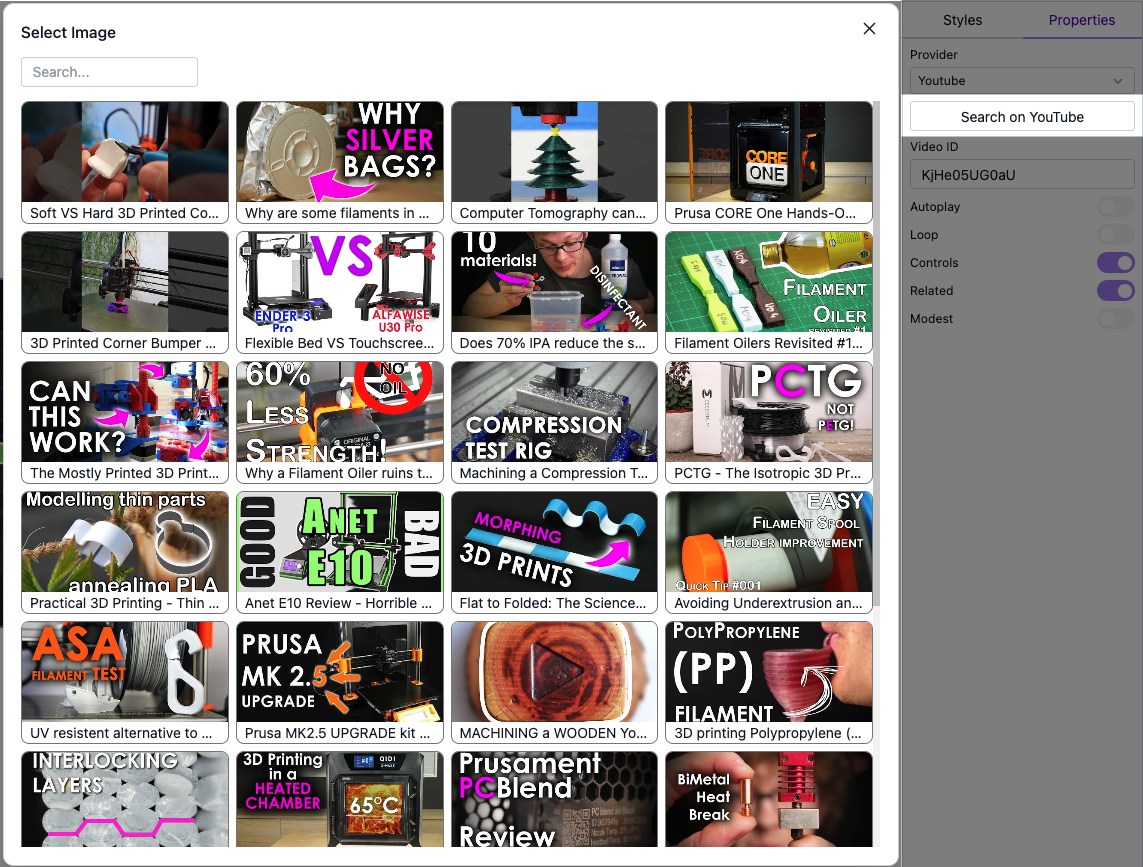
Install the Studio SDK plugins package:
- npm
- pnpm
- yarn
- CDN
npm i @grapesjs/studio-sdk-plugins
pnpm add @grapesjs/studio-sdk-plugins
yarn add @grapesjs/studio-sdk-plugins
// It's recommended to replace the `latest` tag with the specific latest version to avoid any potential breaking changes.
// The loaded plugin is globally available via `globalThis.StudioSdkPlugins_youtubeAssetProvider`.
"https://unpkg.com/@grapesjs/studio-sdk-plugins@latest/dist/youtubeAssetProvider/index.umd.js"
Use the plugin in the project with your YouTube apiKey:
You must provide your own apiKey in the plugin options when using this in your project.
Get a YouTube Data API v3 key from the Google Cloud Console.
- React
- JS
- 🍇 Demo
import StudioEditor from '@grapesjs/studio-sdk/react';
import '@grapesjs/studio-sdk/style';
import { youtubeAssetProvider } from '@grapesjs/studio-sdk-plugins';
// ...
<StudioEditor
  options={{
    project: {
      default: {
        pages: [{
          name: 'Home',
          component: `
            <h2>Double click the video below to open the YouTube Provider</h2>
            <iframe data-gjs-type="video" data-gjs-provider="yt" style="width: 300px"/>
          `
        }]
      }
    },
    plugins: [
      youtubeAssetProvider.init({
        apiKey: 'YOUTUBE_API_KEY',
        searchParams: ({ searchValue }) => ({
          q: searchValue || 'Default search query',
        })
      }),
      editor => {
        editor.onReady(() => {
          const videoCmp = editor.getWrapper().findType('video')[0];
          editor.select(videoCmp);
        });
      }
    ],

  }}
/>
import createStudioEditor from '@grapesjs/studio-sdk';
import '@grapesjs/studio-sdk/style';
import { youtubeAssetProvider } from '@grapesjs/studio-sdk-plugins';
// ...
createStudioEditor({
  project: {
    default: {
      pages: [{
        name: 'Home',
        component: `
          <h2>Double click the video below to open the YouTube Provider</h2>
          <iframe data-gjs-type="video" data-gjs-provider="yt" style="width: 300px"/>
        `
      }]
    }
  },
  plugins: [
    youtubeAssetProvider.init({
      apiKey: 'YOUTUBE_API_KEY',
      searchParams: ({ searchValue }) => ({
        q: searchValue || 'Default search query',
      })
    }),
    editor => {
      editor.onReady(() => {
        const videoCmp = editor.getWrapper().findType('video')[0];
        editor.select(videoCmp);
      });
    }
  ],

})
The demo uses a shared apiKey, which may occasionally exceed YouTube's rate limits.
Plugin options
| Property | Type | Description |
|---|---|---|
licenseKey | string | The license key for the plugin. This is optional, only required if the plugin is used outside of Studio SDK. Example |
apiKey | string | A YouTube Data API v3 key. Get yours at https://console.cloud.google.com/ |
searchParams | SearchParamsProps | Override search params used for listing videos. |
thumbnailQuality | string | Preferred thumbnail quality Default |
skipVideoComponent | boolean | Don't add the 'Search on YouTube' button to properties panel of the video component. Default |
i18n | object |
SearchParams properties
Show properties
| Property | Type | Description |
|---|---|---|
auth | Auth client or API Key for the request | |
$.xgafv | string | V1 error format. |
access_token | string | OAuth access token. |
alt | string | Data format for response. |
callback | string | JSONP |
fields | string | Selector specifying which fields to include in a partial response. |
key | string | API key. Your API key identifies your project and provides you with API access, quota, and reports. Required unless you provide an OAuth 2.0 token. |
oauth_token | string | OAuth 2.0 token for the current user. |
prettyPrint | boolean | Returns response with indentations and line breaks. |
quotaUser | string | Available to use for quota purposes for server-side applications. Can be any arbitrary string assigned to a user, but should not exceed 40 characters. |
uploadType | string | Legacy upload protocol for media (e.g. "media", "multipart"). |
upload_protocol | string | Upload protocol for media (e.g. "raw", "multipart"). |
channelId | string | Filter on resources belonging to this channelId. |
channelType | string | Add a filter on the channel search. |
eventType | string | Filter on the livestream status of the videos. |
forContentOwner | boolean | Search owned by a content owner. |
forDeveloper | boolean | Restrict the search to only retrieve videos uploaded using the project id of the authenticated user. |
forMine | boolean | Search for the private videos of the authenticated user. |
location | string | Filter on location of the video |
locationRadius | string | Filter on distance from the location (specified above). |
maxResults | number | The maxResults parameter specifies the maximum number of items that should be returned in the result set. |
onBehalfOfContentOwner | string | Note: This parameter is intended exclusively for YouTube content partners. The onBehalfOfContentOwner parameter indicates that the request's authorization credentials identify a YouTube CMS user who is acting on behalf of the content owner specified in the parameter value. This parameter is intended for YouTube content partners that own and manage many different YouTube channels. It allows content owners to authenticate once and get access to all their video and channel data, without having to provide authentication credentials for each individual channel. The CMS account that the user authenticates with must be linked to the specified YouTube content owner. |
order | string | Sort order of the results. |
pageToken | string | The pageToken parameter identifies a specific page in the result set that should be returned. In an API response, the nextPageToken and prevPageToken properties identify other pages that could be retrieved. |
part | array | The part parameter specifies a list of one or more search resource properties that the API response will include. Set the parameter value to snippet. |
publishedAfter | string | Filter on resources published after this date. |
publishedBefore | string | Filter on resources published before this date. |
q | string | Textual search terms to match. |
regionCode | string | Display the content as seen by viewers in this country. |
relevanceLanguage | string | Return results relevant to this language. |
safeSearch | string | Indicates whether the search results should include restricted content as well as standard content. |
topicId | string | Restrict results to a particular topic. |
type | array | Restrict results to a particular set of resource types from One Platform. |
videoCaption | string | Filter on the presence of captions on the videos. |
videoCategoryId | string | Filter on videos in a specific category. |
videoDefinition | string | Filter on the definition of the videos. |
videoDimension | string | Filter on 3d videos. |
videoDuration | string | Filter on the duration of the videos. |
videoEmbeddable | string | Filter on embeddable videos. |
videoLicense | string | Filter on the license of the videos. |
videoPaidProductPlacement | string | |
videoSyndicated | string | Filter on syndicated videos. |
videoType | string | Filter on videos of a specific type. |