Empty State
Project types | webemail |
Plan | Startup plan |
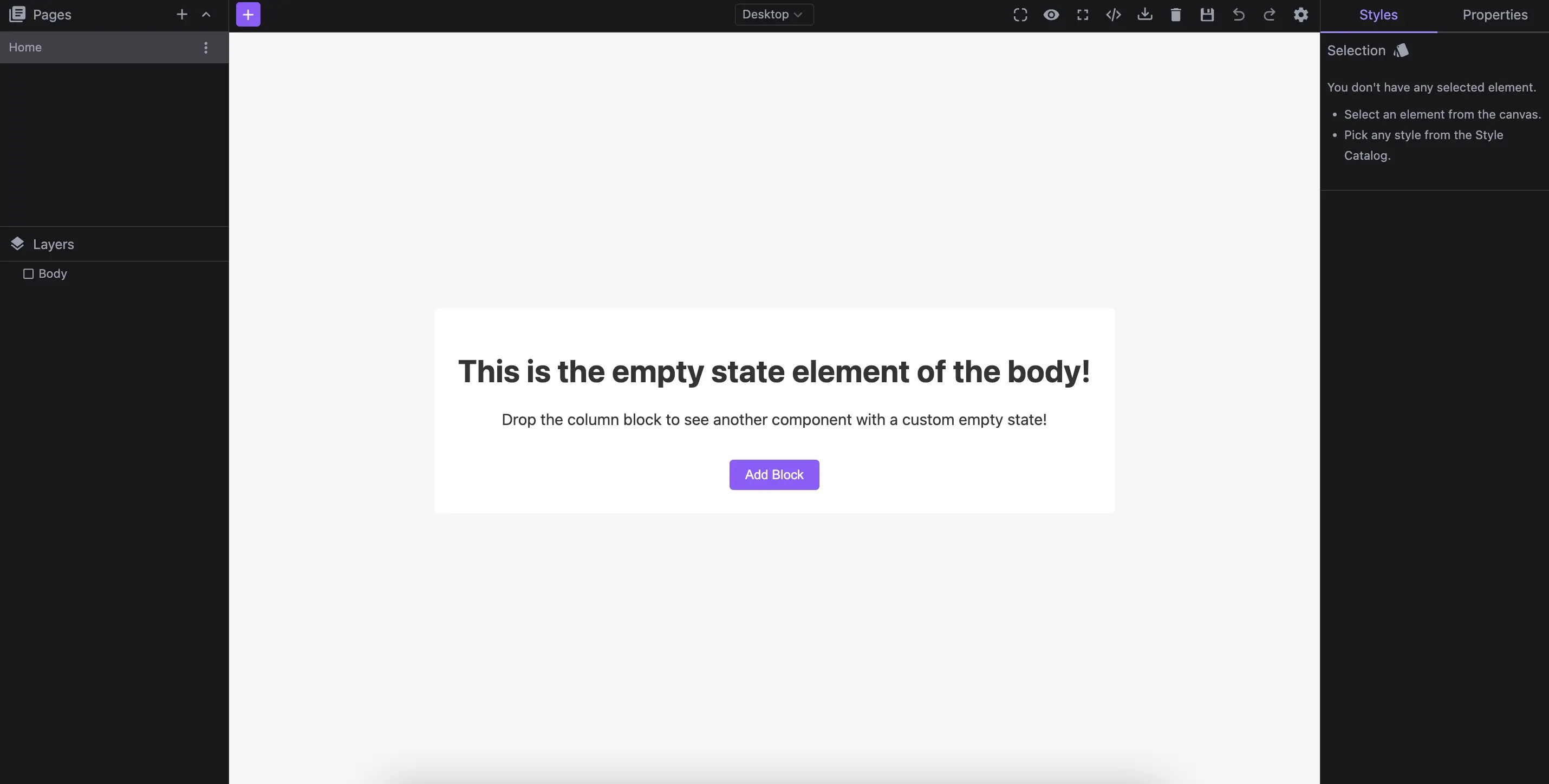
Update empty components with custom content inside.
Install the Studio SDK plugins package:
- npm
- pnpm
- yarn
- CDN
npm i @grapesjs/studio-sdk-plugins
pnpm add @grapesjs/studio-sdk-plugins
yarn add @grapesjs/studio-sdk-plugins
// It's recommended to replace the `latest` tag with the specific latest version to avoid any potential breaking changes.
// The loaded plugin is globally available via `globalThis.StudioSdkPlugins_canvasEmptyState`.
"https://unpkg.com/@grapesjs/studio-sdk-plugins@latest/dist/canvasEmptyState/index.umd.js"
Import and use the plugin in your project:
- React
- JS
- 🍇 Demo
import StudioEditor from '@grapesjs/studio-sdk/react';
import '@grapesjs/studio-sdk/style';
import { canvasEmptyState } from '@grapesjs/studio-sdk-plugins';
// ...
<StudioEditor
  options={{
      // ...
      project: {
        // For demo purposes, define a default empty project to display the body's empty state.
        default: { pages: [{ name: 'Home' }] }
      },
      plugins: [
        canvasEmptyState?.init({
          emptyStates: [
            {
              isValid: ['wrapper'],
              render: ({ editor, mount, unmount }) => {
                const container = document.createElement('div');
                container.className = 'empty-state-wrapper';
                container.innerHTML = `
                  <div class="empty-state-wrapper__card">
                    <div class="empty-state-wrapper__content">
                      <h1>This is the empty state element of the body!</h1>
                      <p>Drop the column block to see another component with a custom empty state!</p>
                    </div>
                    <button class="empty-state-wrapper__btn">Add Block</button>
                  </div>

                  <style>
                  .empty-state-wrapper {
                    font-family: system-ui, sans-serif;
                    background-color: #f5f5f5;
                    display: flex;
                    justify-content: center;
                    align-items: center;
                    height: 100dvh;
                  }
                  .empty-state-wrapper__card {
                    text-align: center;
                    display: flex;
                    flex-direction: column;
                    align-items: center;
                    justify-content: center;
                    padding: 24px;
                    border-radius: 4px;
                    background-color: white;
                    color: #333;
                    gap: 16px;
                  }
                  .empty-state-wrapper__btn {
                    background-color: #8b5cf6;
                    padding: 8px 16px;
                    margin: 0;
                    color: white;
                    border: none;
                    cursor: pointer;
                    border-radius: 4px;
                  }
                  </style>
                `;

                const btn = container.querySelector('button');
                btn.addEventListener('click', () => {
                  editor.runCommand('studio:layoutToggle', {
                    id: 'emptyStateWrapperBlocks',
                    layout: { type: 'panelBlocks' },
                    header: { label: 'Blocks' },
                    placer: { type: 'absolute', position: 'left' }
                  });
                });

                // Mount the empty state container
                mount(container);
                return () => unmount(container);
              }
            },
            {
              isValid: ({ component }) => component.is('gridColumn'),
              render: ({ editor, component, mount }) => {
                const container = document.createElement('div');
                container.className = 'empty-state-wrapper';
                container.innerHTML = `
                  <button class="empty-state-column__btn">Add text to column</button>
                  <style>
                    .empty-state-wrapper {
                      display: flex;
                      justify-content: center;
                      align-items: center;
                    }
                    .empty-state-column__btn {
                      background-color: #8b5cf6;
                      padding: 8px 16px;
                      margin: 0;
                      color: white;
                      border: none;
                      cursor: pointer;
                      border-radius: 4px;
                    }
                  </style>
                `;
                const btn = container.querySelector('button');
                btn.addEventListener('click', () => {
                  const textCmp = component.append('<div>New Text</div>')[0];
                  editor.select(textCmp);
                  textCmp.trigger('active');
                });
                mount(container);
              }
            }
          ]
        })
      ],


  }}
/>
import createStudioEditor from '@grapesjs/studio-sdk';
import '@grapesjs/studio-sdk/style';
import { canvasEmptyState } from '@grapesjs/studio-sdk-plugins';
// ...
createStudioEditor({
    // ...
    project: {
      // For demo purposes, define a default empty project to display the body's empty state.
      default: { pages: [{ name: 'Home' }] }
    },
    plugins: [
      canvasEmptyState?.init({
        emptyStates: [
          {
            isValid: ['wrapper'],
            render: ({ editor, mount, unmount }) => {
              const container = document.createElement('div');
              container.className = 'empty-state-wrapper';
              container.innerHTML = `
                <div class="empty-state-wrapper__card">
                  <div class="empty-state-wrapper__content">
                    <h1>This is the empty state element of the body!</h1>
                    <p>Drop the column block to see another component with a custom empty state!</p>
                  </div>
                  <button class="empty-state-wrapper__btn">Add Block</button>
                </div>

                <style>
                .empty-state-wrapper {
                  font-family: system-ui, sans-serif;
                  background-color: #f5f5f5;
                  display: flex;
                  justify-content: center;
                  align-items: center;
                  height: 100dvh;
                }
                .empty-state-wrapper__card {
                  text-align: center;
                  display: flex;
                  flex-direction: column;
                  align-items: center;
                  justify-content: center;
                  padding: 24px;
                  border-radius: 4px;
                  background-color: white;
                  color: #333;
                  gap: 16px;
                }
                .empty-state-wrapper__btn {
                  background-color: #8b5cf6;
                  padding: 8px 16px;
                  margin: 0;
                  color: white;
                  border: none;
                  cursor: pointer;
                  border-radius: 4px;
                }
                </style>
              `;

              const btn = container.querySelector('button');
              btn.addEventListener('click', () => {
                editor.runCommand('studio:layoutToggle', {
                  id: 'emptyStateWrapperBlocks',
                  layout: { type: 'panelBlocks' },
                  header: { label: 'Blocks' },
                  placer: { type: 'absolute', position: 'left' }
                });
              });

              // Mount the empty state container
              mount(container);
              return () => unmount(container);
            }
          },
          {
            isValid: ({ component }) => component.is('gridColumn'),
            render: ({ editor, component, mount }) => {
              const container = document.createElement('div');
              container.className = 'empty-state-wrapper';
              container.innerHTML = `
                <button class="empty-state-column__btn">Add text to column</button>
                <style>
                  .empty-state-wrapper {
                    display: flex;
                    justify-content: center;
                    align-items: center;
                  }
                  .empty-state-column__btn {
                    background-color: #8b5cf6;
                    padding: 8px 16px;
                    margin: 0;
                    color: white;
                    border: none;
                    cursor: pointer;
                    border-radius: 4px;
                  }
                </style>
              `;
              const btn = container.querySelector('button');
              btn.addEventListener('click', () => {
                const textCmp = component.append('<div>New Text</div>')[0];
                editor.select(textCmp);
                textCmp.trigger('active');
              });
              mount(container);
            }
          }
        ]
      })
    ],


})
Plugin options
| Property | Type | Description |
|---|---|---|
licenseKey | string | The license key for the plugin. This is optional, only required if the plugin is used outside of Studio SDK. Example |
emptyStates | array | Empty state types to render. Example |