Printable
Project types | document |
Plan | Free plan |
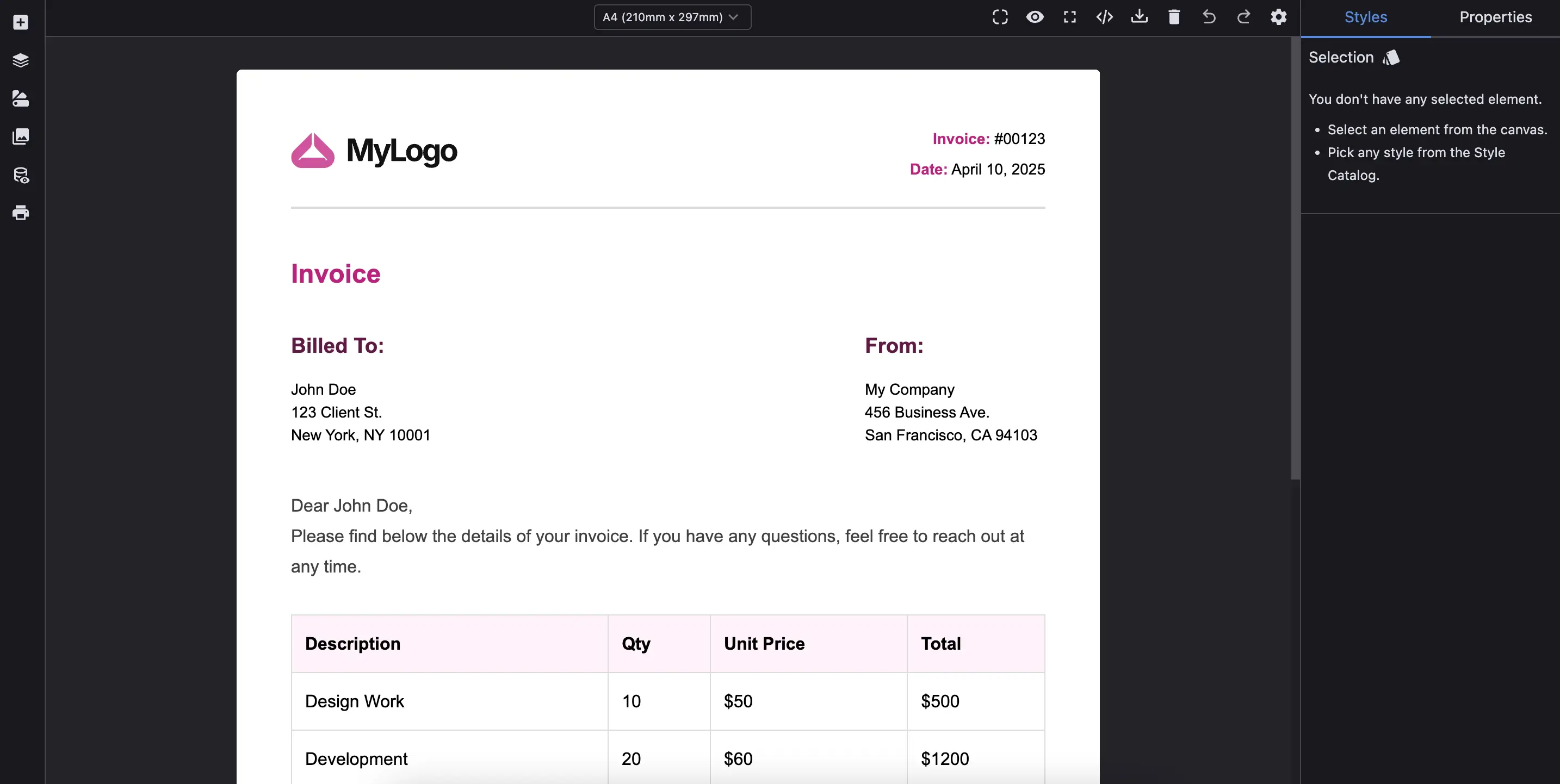
This preset plugin is designed to help you build HTML content that's consistent and optimized for printing. It includes default printable device sizes (like A4, A5, etc.), additional components (eg. pageBreak component) and provides utility commands such as triggering the browser's print preview across all pages.
Install the Studio SDK plugins package:
- npm
- pnpm
- yarn
- CDN
npm i @grapesjs/studio-sdk-plugins
pnpm add @grapesjs/studio-sdk-plugins
yarn add @grapesjs/studio-sdk-plugins
// It's recommended to replace the `latest` tag with the specific latest version to avoid any potential breaking changes.
// The loaded plugin is globally available via `globalThis.StudioSdkPlugins_presetPrintable`.
"https://unpkg.com/@grapesjs/studio-sdk-plugins@latest/dist/presetPrintable/index.umd.js"
Import and use the plugin in your project:
- React
- JS
- 🍇 Demo
import StudioEditor from '@grapesjs/studio-sdk/react';
import '@grapesjs/studio-sdk/style';
import { presetPrintable, canvasFullSize } from '@grapesjs/studio-sdk-plugins';
// ...
<StudioEditor
  options={{
      // ...
      plugins: [
        presetPrintable,
        canvasFullSize, // Optional
      ],
      project: {
        type: 'document', // Ensure the project type is set to 'document'
        default: {
          pages: [
            {
              name: 'Invoice',
              component: `<!DOCTYPE html>
                <html>
                  <body style="padding: 40px; font-family: Arial, Helvetica, sans-serif">
                    <header class="invoice-header flex-between mb-40">
                      <div>
                        <h1>INVOICE</h1>
                        <p class="mb-4">#INV-00123</p>
                        <p class="mb-4">Date: 2025-05-28</p>
                      </div>
                      <div style="line-height: 1.5rem">
                        <strong>Your Company</strong><br />
                        123 Business Street<br />
                        City, Country
                      </div>
                    </header>

                    <section class="mb-40">
                      <h3 class="mb-10">Bill To:</h3>
                      <div style="line-height: 1.5rem">
                        Client Name<br/>
                        Client Company<br/>
                        456 Client Road<br/>
                        City, Country<br/>
                      </div>
                    </section>

                    <table class="invoice-table">
                      <thead>
                        <tr>
                          <th>Description</th>
                          <th>Qty</th>
                          <th>Unit Price</th>
                          <th>Total</th>
                        </tr>
                      </thead>
                      <tbody>
                        <tr>
                          <td>Design Services</td>
                          <td>10</td>
                          <td>$50</td>
                          <td>$500</td>
                        </tr>
                        <tr>
                          <td>Hosting (3 months)</td>
                          <td>1</td>
                          <td>$150</td>
                          <td>$150</td>
                        </tr>
                      </tbody>
                    </table>

                    <section class="total-section mb-40" style="text-align: right;">
                      <p class="mb-4"><strong>Subtotal:</strong> $650</p>
                      <p class="mb-4"><strong>Tax (10%):</strong> $65</p>
                      <p class="mb-4" style="font-size: 18px;"><strong>Total:</strong> $715</p>
                    </section>

                    <footer class="invoice-footer" style="text-align: center;">
                      Thank you for your business!<br />
                      Payment is due within 15 days.
                    </footer>
                  </body>
                  <style>
                    .flex-between {
                      display: flex;
                      justify-content: space-between;
                      align-items: center;
                    }

                    .mb-40 { margin-bottom: 40px; }
                    .mb-10 { margin-bottom: 10px; }
                    .mb-4 { margin-bottom: 4px; }

                    .invoice-header h1 {
                      margin: 0;
                    }

                    .invoice-table {
                      width: 100%;
                      border-collapse: collapse;
                      margin-bottom: 40px;
                    }

                    .invoice-table th,
                    .invoice-table td {
                      padding: 12px;
                      border: 1px solid #ddd;
                      text-align: right;
                    }

                    .invoice-table th:first-child,
                    .invoice-table td:first-child {
                      text-align: left;
                    }

                    .invoice-table thead {
                      background-color: #f5f5f5;
                    }

                    .invoice-footer {
                      font-size: 12px;
                      color: #888;
                    }
                  </style>
                <html>
              `,
            }
          ]
        }
      },
      // Custom layout for demo purposes
      layout: {
        default: {
          type: 'row',
          height: '100%',
          children: [
            {
              type: 'sidebarLeft',
              children: { type: 'panelLayers', header: { label: 'Layers', collapsible: false, icon: 'layers' } }
            },
            {
              type: 'canvasSidebarTop',
              sidebarTop: {
                rightContainer: {
                  buttons: ({ items }) => [
                    {
                      id: 'print',
                      icon: '<svg viewBox="0 0 24 24"><path d="M18 3H6v4h12m1 5a1 1 0 0 1-1-1 1 1 0 0 1 1-1 1 1 0 0 1 1 1 1 1 0 0 1-1 1m-3 7H8v-5h8m3-6H5a3 3 0 0 0-3 3v6h4v4h12v-4h4v-6a3 3 0 0 0-3-3Z"/></svg>',
                      onClick: ({ editor }) => editor.runCommand('presetPrintable:print')
                    },
                    ...items.filter(item => !['showImportCode', 'fullscreen'].includes(item.id))
                  ]
                }
              }
            },
            { type: 'sidebarRight' }
          ]
        }
      },


  }}
/>
import createStudioEditor from '@grapesjs/studio-sdk';
import '@grapesjs/studio-sdk/style';
import { presetPrintable, canvasFullSize } from '@grapesjs/studio-sdk-plugins';
// ...
createStudioEditor({
    // ...
    plugins: [
      presetPrintable,
      canvasFullSize, // Optional
    ],
    project: {
      type: 'document', // Ensure the project type is set to 'document'
      default: {
        pages: [
          {
            name: 'Invoice',
            component: `<!DOCTYPE html>
              <html>
                <body style="padding: 40px; font-family: Arial, Helvetica, sans-serif">
                  <header class="invoice-header flex-between mb-40">
                    <div>
                      <h1>INVOICE</h1>
                      <p class="mb-4">#INV-00123</p>
                      <p class="mb-4">Date: 2025-05-28</p>
                    </div>
                    <div style="line-height: 1.5rem">
                      <strong>Your Company</strong><br />
                      123 Business Street<br />
                      City, Country
                    </div>
                  </header>

                  <section class="mb-40">
                    <h3 class="mb-10">Bill To:</h3>
                    <div style="line-height: 1.5rem">
                      Client Name<br/>
                      Client Company<br/>
                      456 Client Road<br/>
                      City, Country<br/>
                    </div>
                  </section>

                  <table class="invoice-table">
                    <thead>
                      <tr>
                        <th>Description</th>
                        <th>Qty</th>
                        <th>Unit Price</th>
                        <th>Total</th>
                      </tr>
                    </thead>
                    <tbody>
                      <tr>
                        <td>Design Services</td>
                        <td>10</td>
                        <td>$50</td>
                        <td>$500</td>
                      </tr>
                      <tr>
                        <td>Hosting (3 months)</td>
                        <td>1</td>
                        <td>$150</td>
                        <td>$150</td>
                      </tr>
                    </tbody>
                  </table>

                  <section class="total-section mb-40" style="text-align: right;">
                    <p class="mb-4"><strong>Subtotal:</strong> $650</p>
                    <p class="mb-4"><strong>Tax (10%):</strong> $65</p>
                    <p class="mb-4" style="font-size: 18px;"><strong>Total:</strong> $715</p>
                  </section>

                  <footer class="invoice-footer" style="text-align: center;">
                    Thank you for your business!<br />
                    Payment is due within 15 days.
                  </footer>
                </body>
                <style>
                  .flex-between {
                    display: flex;
                    justify-content: space-between;
                    align-items: center;
                  }

                  .mb-40 { margin-bottom: 40px; }
                  .mb-10 { margin-bottom: 10px; }
                  .mb-4 { margin-bottom: 4px; }

                  .invoice-header h1 {
                    margin: 0;
                  }

                  .invoice-table {
                    width: 100%;
                    border-collapse: collapse;
                    margin-bottom: 40px;
                  }

                  .invoice-table th,
                  .invoice-table td {
                    padding: 12px;
                    border: 1px solid #ddd;
                    text-align: right;
                  }

                  .invoice-table th:first-child,
                  .invoice-table td:first-child {
                    text-align: left;
                  }

                  .invoice-table thead {
                    background-color: #f5f5f5;
                  }

                  .invoice-footer {
                    font-size: 12px;
                    color: #888;
                  }
                </style>
              <html>
            `,
          }
        ]
      }
    },
    // Custom layout for demo purposes
    layout: {
      default: {
        type: 'row',
        height: '100%',
        children: [
          {
            type: 'sidebarLeft',
            children: { type: 'panelLayers', header: { label: 'Layers', collapsible: false, icon: 'layers' } }
          },
          {
            type: 'canvasSidebarTop',
            sidebarTop: {
              rightContainer: {
                buttons: ({ items }) => [
                  {
                    id: 'print',
                    icon: '<svg viewBox="0 0 24 24"><path d="M18 3H6v4h12m1 5a1 1 0 0 1-1-1 1 1 0 0 1 1-1 1 1 0 0 1 1 1 1 1 0 0 1-1 1m-3 7H8v-5h8m3-6H5a3 3 0 0 0-3 3v6h4v4h12v-4h4v-6a3 3 0 0 0-3-3Z"/></svg>',
                    onClick: ({ editor }) => editor.runCommand('presetPrintable:print')
                  },
                  ...items.filter(item => !['showImportCode', 'fullscreen'].includes(item.id))
                ]
              }
            }
          },
          { type: 'sidebarRight' }
        ]
      }
    },


})
Repeatable Elements
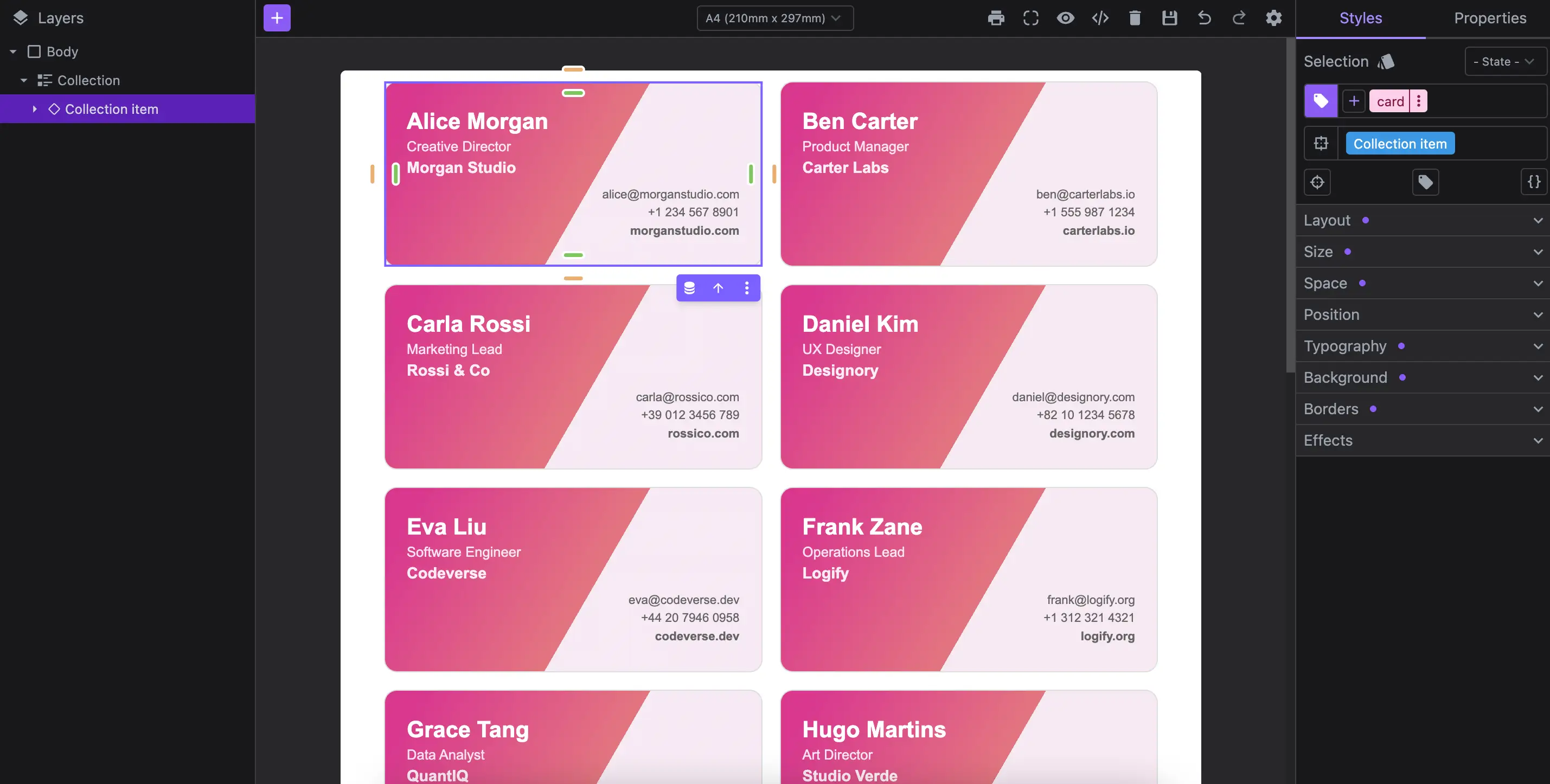
The example below shows how to render collections of repeatable elements using dynamic data, ideal for print-ready layouts like badges, labels, or employee cards.
- React
- JS
- 🍇 Demo
import StudioEditor from '@grapesjs/studio-sdk/react';
import '@grapesjs/studio-sdk/style';
import { presetPrintable, canvasFullSize } from '@grapesjs/studio-sdk-plugins';
// ...
<StudioEditor
options={{
// ...
plugins: [
presetPrintable.init({
blockPageBreak: false
}),
canvasFullSize,
],
project: {
type: 'document',
default: {
pages: [
{
name: 'Invoice',
component: `<!DOCTYPE html>
<html>
<head>
<style>
.cards {
display: grid;
grid-template-columns: repeat(2, 1fr);
gap: 1em;
}
.card {
background-image:linear-gradient(120deg,rgba(217,56,143,1) 8%,rgba(227,118,128,1) 55%,rgba(247,234,244,1) 55%);
border-radius: 12px;
padding: 20px;
color: white;
height: 171px;
border: 1px solid #ddd;
display: flex;
flex-direction: column;
justify-content: center;
}
.card-left {
align-self: flex-start;
}
.card-right {
align-self: flex-end;
text-align: right;
color: #555;
}
.name {
font-size: 1.3em;
font-weight: 700;
}
.title {
font-size: 0.8em;
opacity: 0.85;
margin: 4px 0;
}
.company {
font-size: 0.9em;
font-weight: 600;
margin-bottom: 8px;
opacity: 0.9;
}
.contact {
font-size: 0.7em;
line-height: 1.5;
opacity: 0.9;
}
</style>
</head>
<body style="padding: 10px 40px; font-family: Arial, Helvetica, sans-serif">
<data-collection
class="cards"
data-gjs-data-resolver='{"collectionId": "ppl", "dataSource": {"type":"data-variable", "path":"globalData.people.data" } }'
>
<data-collection-item class="card">
<div class="card-left">
<div class="name" data-gjs-type="data-variable" data-gjs-data-resolver='{"collectionId": "ppl", "variableType": "currentItem", "path": "name" }'></div>
<div class="title" data-gjs-type="data-variable" data-gjs-data-resolver='{"collectionId": "ppl", "variableType": "currentItem", "path": "title" }'></div>
<div class="company" data-gjs-type="data-variable" data-gjs-data-resolver='{"collectionId": "ppl", "variableType": "currentItem", "path": "company" }'></div>
</div>
<div class="card-right">
<div class="contact">
<data-variable data-gjs-data-resolver='{"collectionId": "ppl", "variableType": "currentItem", "path": "email" }'></data-variable><br/>
<data-variable data-gjs-data-resolver='{"collectionId": "ppl", "variableType": "currentItem", "path": "phone" }'></data-variable><br/>
<b data-gjs-type="data-variable" data-gjs-data-resolver='{"collectionId": "ppl", "variableType": "currentItem", "path": "website" }'></b>
</div>
</div>
</data-collection-item>
</ul>
</body>
<html>
`,
}
]
}
},
dataSources: {
globalData: {
people: [
{
name: 'Alice Morgan',
title: 'Creative Director',
company: 'Morgan Studio',
phone: '+1 234 567 8901',
website: 'morganstudio.com'
},
{
name: 'Ben Carter',
title: 'Product Manager',
company: 'Carter Labs',
phone: '+1 555 987 1234',
website: 'carterlabs.io'
},
{
name: 'Carla Rossi',
title: 'Marketing Lead',
company: 'Rossi & Co',
phone: '+39 012 3456 789',
website: 'rossico.com'
},
{
name: 'Daniel Kim',
title: 'UX Designer',
company: 'Designory',
phone: '+82 10 1234 5678',
website: 'designory.com'
},
{
name: 'Eva Liu',
title: 'Software Engineer',
company: 'Codeverse',
phone: '+44 20 7946 0958',
website: 'codeverse.dev'
},
{
name: 'Frank Zane',
title: 'Operations Lead',
company: 'Logify',
phone: '+1 312 321 4321',
website: 'logify.org'
},
{
name: 'Grace Tang',
title: 'Data Analyst',
company: 'QuantIQ',
phone: '+61 3 9123 4567',
website: 'quantiq.com'
},
{
name: 'Hugo Martins',
title: 'Art Director',
company: 'Studio Verde',
phone: '+55 11 98765 4321',
website: 'verde.studio'
},
{
name: 'Isabel Romero',
title: 'HR Manager',
company: 'PeopleFlow',
phone: '+34 91 234 5678',
website: 'peopleflow.com'
},
{
name: 'Jason Lee',
title: 'CTO',
company: 'Devstream',
phone: '+1 800 123 4567',
website: 'devstream.io'
},
{
name: 'Klara Schmidt',
title: 'Finance Consultant',
company: 'LedgerWise',
phone: '+49 30 1234 5678',
website: 'ledgerwise.de'
},
{
name: 'Luis Hernandez',
title: 'Full Stack Developer',
company: 'BitForge',
phone: '+52 55 1234 5678',
website: 'bitforge.tech'
},
{
name: 'Nina Patel',
title: 'Content Strategist',
company: 'StoryGrid',
phone: '+91 22 4000 1234',
website: 'storygrid.com'
},
{
name: 'Omar Khalid',
title: 'Growth Hacker',
company: 'ScaleUp',
phone: '+971 4 567 1234',
website: 'scaleup.app'
},
{
name: 'Yuki Tanaka',
title: 'Innovation Lead',
company: 'Neogenics',
phone: '+81 3 1234 5678',
website: 'neogenics.jp'
}
]
}
},
// Custom layout for demo purposes
layout: {
default: {
type: 'row',
height: '100%',
children: [
{
type: 'sidebarLeft',
children: { type: 'panelLayers', header: { label: 'Layers', collapsible: false, icon: 'layers' } }
},
{
type: 'canvasSidebarTop',
sidebarTop: {
rightContainer: {
buttons: ({ items }) => [
{
id: 'print',
icon: '<svg viewBox="0 0 24 24"><path d="M18 3H6v4h12m1 5a1 1 0 0 1-1-1 1 1 0 0 1 1-1 1 1 0 0 1 1 1 1 1 0 0 1-1 1m-3 7H8v-5h8m3-6H5a3 3 0 0 0-3 3v6h4v4h12v-4h4v-6a3 3 0 0 0-3-3Z"/></svg>',
onClick: ({ editor }) => editor.runCommand('presetPrintable:print')
},
...items.filter(item => !['showImportCode', 'fullscreen'].includes(item.id))
]
}
}
},
{ type: 'sidebarRight' }
]
}
},
}}
/>
import createStudioEditor from '@grapesjs/studio-sdk';
import '@grapesjs/studio-sdk/style';
import { presetPrintable, canvasFullSize } from '@grapesjs/studio-sdk-plugins';
// ...
createStudioEditor({
// ...
plugins: [
presetPrintable.init({
blockPageBreak: false
}),
canvasFullSize,
],
project: {
type: 'document',
default: {
pages: [
{
name: 'Invoice',
component: `<!DOCTYPE html>
<html>
<head>
<style>
.cards {
display: grid;
grid-template-columns: repeat(2, 1fr);
gap: 1em;
}
.card {
background-image:linear-gradient(120deg,rgba(217,56,143,1) 8%,rgba(227,118,128,1) 55%,rgba(247,234,244,1) 55%);
border-radius: 12px;
padding: 20px;
color: white;
height: 171px;
border: 1px solid #ddd;
display: flex;
flex-direction: column;
justify-content: center;
}
.card-left {
align-self: flex-start;
}
.card-right {
align-self: flex-end;
text-align: right;
color: #555;
}
.name {
font-size: 1.3em;
font-weight: 700;
}
.title {
font-size: 0.8em;
opacity: 0.85;
margin: 4px 0;
}
.company {
font-size: 0.9em;
font-weight: 600;
margin-bottom: 8px;
opacity: 0.9;
}
.contact {
font-size: 0.7em;
line-height: 1.5;
opacity: 0.9;
}
</style>
</head>
<body style="padding: 10px 40px; font-family: Arial, Helvetica, sans-serif">
<data-collection
class="cards"
data-gjs-data-resolver='{"collectionId": "ppl", "dataSource": {"type":"data-variable", "path":"globalData.people.data" } }'
>
<data-collection-item class="card">
<div class="card-left">
<div class="name" data-gjs-type="data-variable" data-gjs-data-resolver='{"collectionId": "ppl", "variableType": "currentItem", "path": "name" }'></div>
<div class="title" data-gjs-type="data-variable" data-gjs-data-resolver='{"collectionId": "ppl", "variableType": "currentItem", "path": "title" }'></div>
<div class="company" data-gjs-type="data-variable" data-gjs-data-resolver='{"collectionId": "ppl", "variableType": "currentItem", "path": "company" }'></div>
</div>
<div class="card-right">
<div class="contact">
<data-variable data-gjs-data-resolver='{"collectionId": "ppl", "variableType": "currentItem", "path": "email" }'></data-variable><br/>
<data-variable data-gjs-data-resolver='{"collectionId": "ppl", "variableType": "currentItem", "path": "phone" }'></data-variable><br/>
<b data-gjs-type="data-variable" data-gjs-data-resolver='{"collectionId": "ppl", "variableType": "currentItem", "path": "website" }'></b>
</div>
</div>
</data-collection-item>
</ul>
</body>
<html>
`,
}
]
}
},
dataSources: {
globalData: {
people: [
{
name: 'Alice Morgan',
title: 'Creative Director',
company: 'Morgan Studio',
phone: '+1 234 567 8901',
website: 'morganstudio.com'
},
{
name: 'Ben Carter',
title: 'Product Manager',
company: 'Carter Labs',
phone: '+1 555 987 1234',
website: 'carterlabs.io'
},
{
name: 'Carla Rossi',
title: 'Marketing Lead',
company: 'Rossi & Co',
phone: '+39 012 3456 789',
website: 'rossico.com'
},
{
name: 'Daniel Kim',
title: 'UX Designer',
company: 'Designory',
phone: '+82 10 1234 5678',
website: 'designory.com'
},
{
name: 'Eva Liu',
title: 'Software Engineer',
company: 'Codeverse',
phone: '+44 20 7946 0958',
website: 'codeverse.dev'
},
{
name: 'Frank Zane',
title: 'Operations Lead',
company: 'Logify',
phone: '+1 312 321 4321',
website: 'logify.org'
},
{
name: 'Grace Tang',
title: 'Data Analyst',
company: 'QuantIQ',
phone: '+61 3 9123 4567',
website: 'quantiq.com'
},
{
name: 'Hugo Martins',
title: 'Art Director',
company: 'Studio Verde',
phone: '+55 11 98765 4321',
website: 'verde.studio'
},
{
name: 'Isabel Romero',
title: 'HR Manager',
company: 'PeopleFlow',
phone: '+34 91 234 5678',
website: 'peopleflow.com'
},
{
name: 'Jason Lee',
title: 'CTO',
company: 'Devstream',
phone: '+1 800 123 4567',
website: 'devstream.io'
},
{
name: 'Klara Schmidt',
title: 'Finance Consultant',
company: 'LedgerWise',
phone: '+49 30 1234 5678',
website: 'ledgerwise.de'
},
{
name: 'Luis Hernandez',
title: 'Full Stack Developer',
company: 'BitForge',
phone: '+52 55 1234 5678',
website: 'bitforge.tech'
},
{
name: 'Nina Patel',
title: 'Content Strategist',
company: 'StoryGrid',
phone: '+91 22 4000 1234',
website: 'storygrid.com'
},
{
name: 'Omar Khalid',
title: 'Growth Hacker',
company: 'ScaleUp',
phone: '+971 4 567 1234',
website: 'scaleup.app'
},
{
name: 'Yuki Tanaka',
title: 'Innovation Lead',
company: 'Neogenics',
phone: '+81 3 1234 5678',
website: 'neogenics.jp'
}
]
}
},
// Custom layout for demo purposes
layout: {
default: {
type: 'row',
height: '100%',
children: [
{
type: 'sidebarLeft',
children: { type: 'panelLayers', header: { label: 'Layers', collapsible: false, icon: 'layers' } }
},
{
type: 'canvasSidebarTop',
sidebarTop: {
rightContainer: {
buttons: ({ items }) => [
{
id: 'print',
icon: '<svg viewBox="0 0 24 24"><path d="M18 3H6v4h12m1 5a1 1 0 0 1-1-1 1 1 0 0 1 1-1 1 1 0 0 1 1 1 1 1 0 0 1-1 1m-3 7H8v-5h8m3-6H5a3 3 0 0 0-3 3v6h4v4h12v-4h4v-6a3 3 0 0 0-3-3Z"/></svg>',
onClick: ({ editor }) => editor.runCommand('presetPrintable:print')
},
...items.filter(item => !['showImportCode', 'fullscreen'].includes(item.id))
]
}
}
},
{ type: 'sidebarRight' }
]
}
},
})
Plugin options
| Property | Type | Description |
|---|---|---|
licenseKey | string | The license key for the plugin. This is optional, only required if the plugin is used outside of Studio SDK. Example |
blockPageBreak | Block | Additional Block properties of the page break component. Pass Example |
fixedHeight | boolean | With this option enabled the document won't grow in height and it won't be possible to scroll. Default |
devices | function | Customize the printable devices. Example |
selectedDevice | string | Selected device id. Available printable sizes: 'a5', 'a5-portrait', 'a4', 'a3', 'b5', 'b4', 'letter', 'legal', 'ledger'. Default |
enablePageBreaksSpot | boolean | Enables the page break indicators in the canvas. Default |