ProseMirror
Project types | webemail |
Plan | Free plan |
Replace the default RTE with the ProseMirror editor.
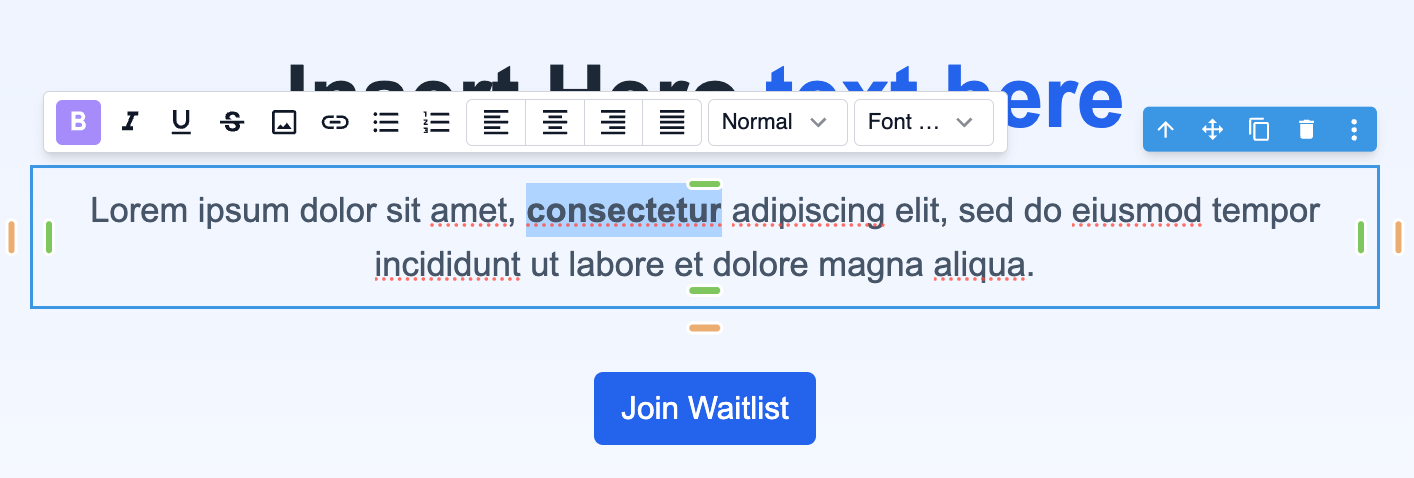
Install the Studio SDK plugins package:
- npm
- pnpm
- yarn
- CDN
npm i @grapesjs/studio-sdk-plugins
pnpm add @grapesjs/studio-sdk-plugins
yarn add @grapesjs/studio-sdk-plugins
// It's recommended to replace the `latest` tag with the specific latest version to avoid any potential breaking changes.
// The loaded plugin is globally available via `globalThis.StudioSdkPlugins_prosemirror`.
"https://unpkg.com/@grapesjs/studio-sdk-plugins@latest/dist/prosemirror/index.umd.js"
Import and use the plugin in your project:
- React
- JS
- 🍇 Demo
import StudioEditor from '@grapesjs/studio-sdk/react';
import '@grapesjs/studio-sdk/style';
import { rteProseMirror } from '@grapesjs/studio-sdk-plugins';
// ...
<StudioEditor
  options={{
      // ...
      plugins: [
        rteProseMirror?.init({
          plugins: ({ plugins }) => [
            // use the default plugins
            ...plugins,
            // Custom ProseMirror plugin
            // new Plugin({ appendTransaction(tr) {} })
          ],
          toolbar({ items, component, layouts, proseMirror, commands }) {
            const { view } = proseMirror;
            return [
              // Default toolbar items
              ...items,
              // Leverage default layouts
              layouts.separator,
              // Add custom Layout components
              {
                id: 'customButton',
                type: 'button',
                icon: 'flare',
                tooltip: 'Replace selection',
                onClick: () => {
                  // leverage prebuilt commands
                  const currText = commands.text.selected();
                  const newText = `Selected: ${currText}, Component name: ${component.getName()}`;
                  // Use the ProseMirror API
                  const { state, dispatch } = view;
                  dispatch(state.tr.replaceSelectionWith(state.schema.text(newText)));
                }
              },
              {
                id: 'variables',
                type: 'selectField',
                emptyState: 'Variables',
                options: [
                  { id: '{{ firstName }}', label: 'First Name' },
                  { id: '{{ lastName }}', label: 'Last Name' }
                ],
                onChange: ({ value }) => commands.text.replace(value, { select: true })
              }
            ];
          }
        })
      ],
      project: {
        default: {
          pages: [
            {
              name: 'Home',
              component: `
                <div data-gjs-type="text">
                  <h1>RTE Plugin</h1>
                  Text content start
                  <div>
                    Block content with <em>emphasis</em>
                    , <b>bold text</b>
                    , <a href="#some-link" target="_blank">link</a>
                    , <img src="https://picsum.photos/seed/1/10/10"> image.
                  </div>
                  <ul>
                    <li>List item 1</li>
                    <li>List item 2</li>
                  </ul>
                  <ol>
                    <li>Ordered list item 1</li>
                    <li>Ordered list item 1</li>
                  </ol>
                  Text content end
                </div>
            `},
          ]
        },
      }

  }}
/>
import createStudioEditor from '@grapesjs/studio-sdk';
import '@grapesjs/studio-sdk/style';
import { rteProseMirror } from '@grapesjs/studio-sdk-plugins';
// ...
createStudioEditor({
    // ...
    plugins: [
      rteProseMirror?.init({
        plugins: ({ plugins }) => [
          // use the default plugins
          ...plugins,
          // Custom ProseMirror plugin
          // new Plugin({ appendTransaction(tr) {} })
        ],
        toolbar({ items, component, layouts, proseMirror, commands }) {
          const { view } = proseMirror;
          return [
            // Default toolbar items
            ...items,
            // Leverage default layouts
            layouts.separator,
            // Add custom Layout components
            {
              id: 'customButton',
              type: 'button',
              icon: 'flare',
              tooltip: 'Replace selection',
              onClick: () => {
                // leverage prebuilt commands
                const currText = commands.text.selected();
                const newText = `Selected: ${currText}, Component name: ${component.getName()}`;
                // Use the ProseMirror API
                const { state, dispatch } = view;
                dispatch(state.tr.replaceSelectionWith(state.schema.text(newText)));
              }
            },
            {
              id: 'variables',
              type: 'selectField',
              emptyState: 'Variables',
              options: [
                { id: '{{ firstName }}', label: 'First Name' },
                { id: '{{ lastName }}', label: 'Last Name' }
              ],
              onChange: ({ value }) => commands.text.replace(value, { select: true })
            }
          ];
        }
      })
    ],
    project: {
      default: {
        pages: [
          {
            name: 'Home',
            component: `
              <div data-gjs-type="text">
                <h1>RTE Plugin</h1>
                Text content start
                <div>
                  Block content with <em>emphasis</em>
                  , <b>bold text</b>
                  , <a href="#some-link" target="_blank">link</a>
                  , <img src="https://picsum.photos/seed/1/10/10"> image.
                </div>
                <ul>
                  <li>List item 1</li>
                  <li>List item 2</li>
                </ul>
                <ol>
                  <li>Ordered list item 1</li>
                  <li>Ordered list item 1</li>
                </ol>
                Text content end
              </div>
          `},
        ]
      },
    }

})
Plugin options
| Property | Type | Description |
|---|---|---|
licenseKey | string | The license key for the plugin. This is optional, only required if the plugin is used outside of Studio SDK. Example |
enableOnClick | boolean | Enable the RTE on click of the text component, instead of the default double-click. Default |
disableOnEsc | boolean | Disable the RTE on pressing the Escape key. Default |
schema | function | Extend the default ProseMirror schema. Example |
plugins | function | Pass additional ProseMirror plugins. Example |
toolbar | function | Customize the toolbar items. Example |
onEnter | function | Custom function to handle the Enter key press. Example |