Fonts

By default, the editor shows a limited set of common system fonts (like Arial, Times New Roman, etc.). To let users access a broader range of fonts, such as web fonts or brand-specific typefaces, you can enable the Font Manager.
The Font Manager requires a font provider to supply available fonts. In this guide, we'll show you how to configure a custom provider, or use the built-in plugins for a quick and easy setup.
Initialization
Below is an example of how to initialize the Font Manager using the Google Fonts Provider plugin. This setup allows users to browse and apply a wide range of fonts directly within the editor.
- React
- JS
- 🍇 Demo
import StudioEditor from '@grapesjs/studio-sdk/react';
import '@grapesjs/studio-sdk/style';
import { googleFontsAssetProvider } from '@grapesjs/studio-sdk-plugins';
// ...
<StudioEditor
  options={{
    fonts: {
      enableFontManager: true,
    },
    project: {
      default: {
        pages: [{
          name: 'Home',
          component: '<p>Open the Typography section on the right panel. Use the "+" button in the "Font" property to add new fonts.</p>'
        }]
      }
    },
    plugins: [
      googleFontsAssetProvider.init({ apiKey: 'GOOGLE_FONTS_API_KEY' }),
      editor => {
        editor.onReady(() => {
          const textCmp = editor.getWrapper().find('p')[0];
          editor.select(textCmp);
        });
      }
    ],
  }}
/>
import createStudioEditor from '@grapesjs/studio-sdk';
import '@grapesjs/studio-sdk/style';
import { googleFontsAssetProvider } from '@grapesjs/studio-sdk-plugins';
// ...
createStudioEditor({
  fonts: {
    enableFontManager: true,
  },
  project: {
    default: {
      pages: [{
        name: 'Home',
        component: '<p>Open the Typography section on the right panel. Use the "+" button in the "Font" property to add new fonts.</p>'
      }]
    }
  },
  plugins: [
    googleFontsAssetProvider.init({ apiKey: 'GOOGLE_FONTS_API_KEY' }),
    editor => {
      editor.onReady(() => {
        const textCmp = editor.getWrapper().find('p')[0];
        editor.select(textCmp);
      });
    }
  ],
})
Project Fonts

Custom fonts are stored in the project JSON under custom.globalPageSettings.fonts. When the Font Manager is enabled, these fonts will appear in the Global Page Settings panel within the editor.
You can also preconfigure your project (e.g. in Templates) by including default custom fonts in the initial JSON.
- React
- JS
- 🍇 Demo
import StudioEditor from '@grapesjs/studio-sdk/react';
import '@grapesjs/studio-sdk/style';

// ...
<StudioEditor
  options={{
    fonts: {
      enableFontManager: true,
      // You can also disable showing project fonts in the editor.
      // showProjectFonts: false,
    },
    project: {
      default: {
        pages: [
          {
            name: 'Home',
            component: `
              <p>Manage your project's fonts:</p>
              <ol>
                <li>Click the gear icon next to the page name "Home" on the top left panel.</li>
                <li>Switch from 'Page: "Home"' to 'Page: "Global Settings"' at the top left and scroll to the bottom.</li>
              </ol>
              <p style="font-family: Aboreto">This text uses the Aboreto font</p>`
          }
        ],
        custom: {
          globalPageSettings: {
            fonts: {
              Aboreto: {
                variants: {
                  regular: {
                    source: 'https://fonts.gstatic.com/s/aboreto/v2/5DCXAKLhwDDQ4N8blKHeA2yuxSY.woff2'
                  }
                }
              }
            }
          }
        }
      }
    }

  }}
/>
import createStudioEditor from '@grapesjs/studio-sdk';
import '@grapesjs/studio-sdk/style';

// ...
createStudioEditor({
  fonts: {
    enableFontManager: true,
    // You can also disable showing project fonts in the editor.
    // showProjectFonts: false,
  },
  project: {
    default: {
      pages: [
        {
          name: 'Home',
          component: `
            <p>Manage your project's fonts:</p>
            <ol>
              <li>Click the gear icon next to the page name "Home" on the top left panel.</li>
              <li>Switch from 'Page: "Home"' to 'Page: "Global Settings"' at the top left and scroll to the bottom.</li>
            </ol>
            <p style="font-family: Aboreto">This text uses the Aboreto font</p>`
        }
      ],
      custom: {
        globalPageSettings: {
          fonts: {
            Aboreto: {
              variants: {
                regular: {
                  source: 'https://fonts.gstatic.com/s/aboreto/v2/5DCXAKLhwDDQ4N8blKHeA2yuxSY.woff2'
                }
              }
            }
          }
        }
      }
    }
  }

})
Default Fonts
Use the fonts.default option to customize the default fonts shown in the font family fields. You can provide a static array or a function to dynamically extend or modify the list.
- React
- JS
- 🍇 Demo
import StudioEditor from '@grapesjs/studio-sdk/react';
import '@grapesjs/studio-sdk/style';

// ...
<StudioEditor
  options={{
    fonts: {
      enableFontManager: true,
      default: ({ baseDefault }) => [
        // Add font objects with font files. This will be added to the project JSON automatically.
        {
          family: 'Aboreto',
          variants: {
            regular: { source: 'https://fonts.gstatic.com/s/aboreto/v2/5DCXAKLhwDDQ4N8blKHeA2yuxSY.woff2' }
          }
        },
        // Add fonts without font files that rely on system fonts with fallbacks.
        {
          id: '"Times New Roman", serif',
          label: 'Times New Roman'
        },
        // Use parts of the base default fonts.
        baseDefault[0]
      ]
    },
    project: {
      default: {
        pages: [
          {
            name: 'Home',
            component: '<p style="font-family: Aboreto;">Open the Typography section on the right panel. Use the "+" button in the "Font" property to add new fonts.</p>'
          }
        ]
      }
    },
    plugins: [
      editor => {
        editor.onReady(() => {
          const textCmp = editor.getWrapper().find('p')[0];
          editor.select(textCmp);
        });
      }
    ]

  }}
/>
import createStudioEditor from '@grapesjs/studio-sdk';
import '@grapesjs/studio-sdk/style';

// ...
createStudioEditor({
  fonts: {
    enableFontManager: true,
    default: ({ baseDefault }) => [
      // Add font objects with font files. This will be added to the project JSON automatically.
      {
        family: 'Aboreto',
        variants: {
          regular: { source: 'https://fonts.gstatic.com/s/aboreto/v2/5DCXAKLhwDDQ4N8blKHeA2yuxSY.woff2' }
        }
      },
      // Add fonts without font files that rely on system fonts with fallbacks.
      {
        id: '"Times New Roman", serif',
        label: 'Times New Roman'
      },
      // Use parts of the base default fonts.
      baseDefault[0]
    ]
  },
  project: {
    default: {
      pages: [
        {
          name: 'Home',
          component: '<p style="font-family: Aboreto;">Open the Typography section on the right panel. Use the "+" button in the "Font" property to add new fonts.</p>'
        }
      ]
    }
  },
  plugins: [
    editor => {
      editor.onReady(() => {
        const textCmp = editor.getWrapper().find('p')[0];
        editor.select(textCmp);
      });
    }
  ]

})
Font Providers
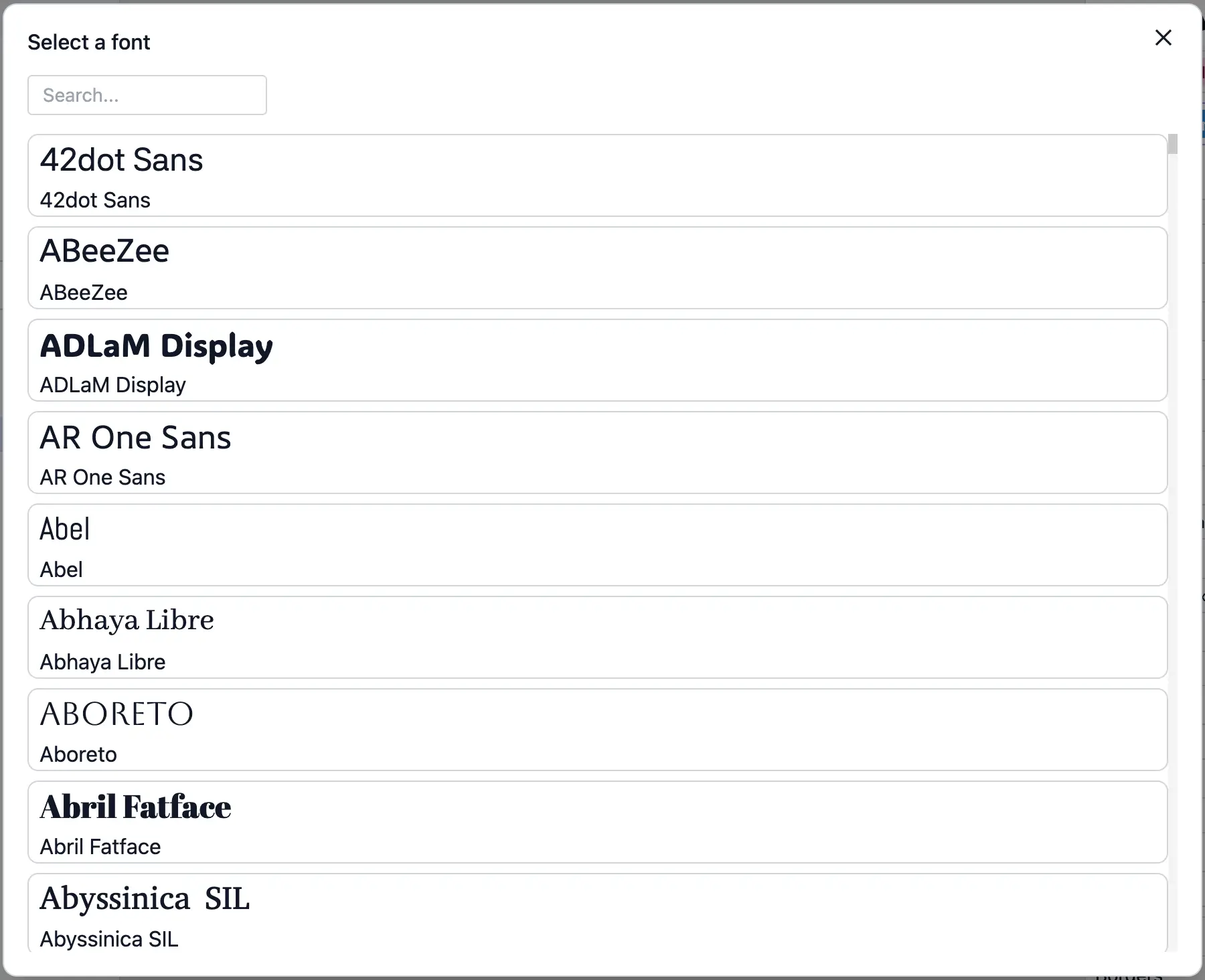
Font providers are responsible for supplying custom fonts to the editor. You can use the Asset Providers interface to add additional fonts, either through a built-in plugin like Google Fonts or by defining your own provider to load fonts from any external source or internal service.
Below is an example of how to create a custom font provider.
- React
- JS
- 🍇 Demo
import StudioEditor from '@grapesjs/studio-sdk/react';
import '@grapesjs/studio-sdk/style';
import { StudioCommands } from '@grapesjs/studio-sdk';
// ...
<StudioEditor
  options={{
    fonts: {
      enableFontManager: true,
    },
    project: {
      default: {
        pages: [
          {
            name: 'Home',
            component: '<p>Open the Typography section on the right panel. Use the "+" button in the "Font" property to add new fonts.</p>'
          }
        ]
      }
    },
    assets: {
      providers: [
        {
          id: "custom-fonts",
          label: "Custom Font Provider",
          types: "font",
          onLoad: async (props) => {
            return [
              {
                id: 'aboreto',
                type: 'font',
                src: 'https://fonts.gstatic.com/s/aboreto/v2/5DCXAKLhwDDQ4N8blKHeA2yuxSY.woff2',
                name: 'Aboreto',
                customData: {
                  font: {
                    family: 'Aboreto',
                    variants: {
                      regular: {
                        source: 'https://fonts.gstatic.com/s/aboreto/v2/5DCXAKLhwDDQ4N8blKHeA2yuxSY.woff2',
                      }
                    }
                  }
                }
              }
            ];
          },
          itemLayout: ({ assetProps, editor, onSelect }) => {
            const { font } = assetProps.customData;
            const fontFamily = editor.runCommand(StudioCommands.menuFontLoad, { font });
            return {
              type: 'column',
              children: [
                {
                  onClick: () => onSelect(assetProps),
                  type: 'button',
                  children: [assetProps.name],
                  style: {
                    fontFamily,
                    fontSize: '24px',
                    padding: '8px'
                  }
                }
              ]
            };
          }
        }
      ]
    },
  }}
/>
import createStudioEditor from '@grapesjs/studio-sdk';
import '@grapesjs/studio-sdk/style';
import { StudioCommands } from '@grapesjs/studio-sdk';
// ...
createStudioEditor({
  fonts: {
    enableFontManager: true,
  },
  project: {
    default: {
      pages: [
        {
          name: 'Home',
          component: '<p>Open the Typography section on the right panel. Use the "+" button in the "Font" property to add new fonts.</p>'
        }
      ]
    }
  },
  assets: {
    providers: [
      {
        id: "custom-fonts",
        label: "Custom Font Provider",
        types: "font",
        onLoad: async (props) => {
          return [
            {
              id: 'aboreto',
              type: 'font',
              src: 'https://fonts.gstatic.com/s/aboreto/v2/5DCXAKLhwDDQ4N8blKHeA2yuxSY.woff2',
              name: 'Aboreto',
              customData: {
                font: {
                  family: 'Aboreto',
                  variants: {
                    regular: {
                      source: 'https://fonts.gstatic.com/s/aboreto/v2/5DCXAKLhwDDQ4N8blKHeA2yuxSY.woff2',
                    }
                  }
                }
              }
            }
          ];
        },
        itemLayout: ({ assetProps, editor, onSelect }) => {
          const { font } = assetProps.customData;
          const fontFamily = editor.runCommand(StudioCommands.menuFontLoad, { font });
          return {
            type: 'column',
            children: [
              {
                onClick: () => onSelect(assetProps),
                type: 'button',
                children: [assetProps.name],
                style: {
                  fontFamily,
                  fontSize: '24px',
                  padding: '8px'
                }
              }
            ]
          };
        }
      }
    ]
  },
})
Font objects define font variants. Each variant has an URL to a font file, and an optional descriptors object.
Font properties
Show properties
| Property | Type | Description |
|---|---|---|
variants* | object | The font variants that will be available in the editor when you add this font. Example |
Variant properties
Show properties
| Property | Type | Description |
|---|---|---|
source* | string | The url with the font file for this variant. |
descriptors | object | Extra arguments for FontFace init. https://developer.mozilla.org/en-US/docs/Web/API/FontFace/FontFace#descriptors Example |
Variable Fonts
The Studio editor supports variable fonts. Describe variable font axes supported by your font file in the variant.descriptors object.
- React
- JS
- 🍇 Demo
import StudioEditor from '@grapesjs/studio-sdk/react';
import '@grapesjs/studio-sdk/style';

// ...
<StudioEditor
  options={{
    fonts: {
      enableFontManager: true,
    },
    project: {
      default: {
        pages: [
          {
            name: 'Home',
            component: `
              <p style="font-family: '42dot Sans';">This text uses the variable font 42dot Sans. Try changing the weight in Styles > Typography > Weight.</p>`
          }
        ],
        custom: {
          globalPageSettings: {
            fonts: {
              "42dot Sans": {
                variants: {
                  regular: {
                    source:
                      "https://fonts.gstatic.com/s/42dotsans/v2/BXRuvFK-2v7FnQ1xTYUJ0WrfXcjWzZw.woff2",
                    descriptors: {
                      // here we describe the range of values supported by the weight axis of this variable font
                      weight: "300 800",
                    },
                  },
                },
              }
            }
          }
        }
      }
    }

  }}
/>
import createStudioEditor from '@grapesjs/studio-sdk';
import '@grapesjs/studio-sdk/style';

// ...
createStudioEditor({
  fonts: {
    enableFontManager: true,
  },
  project: {
    default: {
      pages: [
        {
          name: 'Home',
          component: `
            <p style="font-family: '42dot Sans';">This text uses the variable font 42dot Sans. Try changing the weight in Styles > Typography > Weight.</p>`
        }
      ],
      custom: {
        globalPageSettings: {
          fonts: {
            "42dot Sans": {
              variants: {
                regular: {
                  source:
                    "https://fonts.gstatic.com/s/42dotsans/v2/BXRuvFK-2v7FnQ1xTYUJ0WrfXcjWzZw.woff2",
                  descriptors: {
                    // here we describe the range of values supported by the weight axis of this variable font
                    weight: "300 800",
                  },
                },
              },
            }
          }
        }
      }
    }
  }

})
I18n
These are the i18n keys you can use to customize labels in the Font Manager.
- React
- JS
import StudioEditor from '@grapesjs/studio-sdk/react';
import '@grapesjs/studio-sdk/style';

// ...
<StudioEditor
  options={{
    // ...
    i18n: {
      locales: {
        en: {
          fontManager: {
            addFontToProject: "Add font to project",
            projectFonts: "Project fonts",
            emptyProjectFonts: "There are no fonts in this project.",
            selectFont: "Select a font"
          },
        }
      }
    },
  }}
/>
import createStudioEditor from '@grapesjs/studio-sdk';
import '@grapesjs/studio-sdk/style';

// ...
createStudioEditor({
  // ...
  i18n: {
    locales: {
      en: {
        fontManager: {
          addFontToProject: "Add font to project",
          projectFonts: "Project fonts",
          emptyProjectFonts: "There are no fonts in this project.",
          selectFont: "Select a font"
        },
      }
    }
  },
})
Commands
Here's a list of commands to manage fonts dynamically.
Get Fonts
Get a list of registered fonts.
import { StudioCommands } from '@grapesjs/studio-sdk';
const fonts = editor.runCommand(StudioCommands.fontGet);
Add Font
Register a new font. If a font with the same key already exists, it will be replaced.
import { StudioCommands } from '@grapesjs/studio-sdk';
const font = {
  family: 'Aboreto',
  variants: {
    regular: {
      source: 'https://fonts.gstatic.com/s/aboreto/v2/5DCXAKLhwDDQ4N8blKHeA2yuxSY.woff2'
    }
  }
};
editor.runCommand(StudioCommands.fontAdd, {
  font
});
Remove Font
Remove a registered font.
import { StudioCommands } from '@grapesjs/studio-sdk';
editor.runCommand(StudioCommands.fontRemove, { family: 'Aboreto' });
Open Font Manager
Open the Font Manager.
import { StudioCommands } from '@grapesjs/studio-sdk';
editor.runCommand(StudioCommands.fontManagerOpen, { modalTitle: 'Pick a font' });
Load Menu Font
Loads a custom font for displaying in menu options with a live preview. Some font services offer lightweight font files specifically for preview purposes, which can be used here to improve performance.
import { StudioCommands } from '@grapesjs/studio-sdk';
const font = {
  family: 'Aboreto',
  variants: {
    regular: {
      source: 'https://fonts.gstatic.com/s/aboreto/v2/5DCXAKLhwDDQ4N8blKHeA2yuxSY.woff2'
    }
  }
};
const menuFontFamily = editor.runCommand(StudioCommands.menuFontLoad, { font });